NO-ROOT SETUP • LOCKED BOOTLOADER • ANDROID ADB
Does Shizuku Require Root or Unlock the Bootloader?
No, Shizuku does not require root and does not unlock the bootloader. Most users can start it through wireless debugging on Android 11 or newer, or through computer ADB on supported devices. Root remains an optional method for phones that are already rooted.
Does Shizuku require root? The direct answer
No. Shizuku was designed to work on both rooted and unrooted Android devices. On an unrooted phone, it uses Android’s debugging interface to launch a privileged service. Apps that support the Shizuku API can then request selected system operations through that service.
The common no-root service normally runs as Android’s shell user, the same general privilege context used by ADB commands. It is more capable than an ordinary sandboxed app but still below unrestricted root. Android version, device manufacturer policies, SELinux, and the exact companion app continue to limit what can be done.
Installing the APK alone is not enough. You must start the Shizuku service after installation and authorize a compatible app. If you want a full setup that avoids rooting, see Shizuku without root.
✓
Root Required? No
Wireless debugging and computer ADB start Shizuku with Android shell privileges. The phone does not need a root manager, patched boot image, or superuser access.
🔒
Bootloader Unlock? No
Shizuku does not change the bootloader state. Your bootloader can remain locked, and the setup does not require wiping the phone to unlock it.
⌁
Computer Required? Sometimes
Android 11 and newer can use wireless debugging without a computer. Computer ADB is available for older Android versions and troubleshooting.
Does Shizuku unlock or modify the bootloader?
No. Shizuku does not unlock the bootloader, flash a custom recovery, patch the boot image, install a root manager, or modify protected system partitions. Wireless debugging and computer ADB use Android’s existing developer interfaces. They do not issue a bootloader-unlock operation.
Bootloader unlocking is a separate device-level procedure that often erases user data and changes the device security state. Shizuku does not need that procedure for no-root startup. If the phone is already rooted, its bootloader may already have been unlocked as part of the separate root process, but Shizuku did not perform that change.
Three ways to start Shizuku
Choose the startup method that matches your Android version and current device state. None of the first two methods requires root or an unlocked bootloader.
01
Wireless Debugging
Best for Android 11 and newer. Pair Shizuku from Developer Options, enter the pairing code, and start the service on the same phone. No root or computer is required.
02
Computer ADB
Connect the phone to a computer, authorize USB debugging, and run the startup command shown in Shizuku. Root and bootloader unlocking are not required.
03
Root Startup
If the phone is already rooted, Shizuku can start with root access. This is optional and provides a higher privilege level than normal ADB mode.
Root, computer, and bootloader requirements at a glance
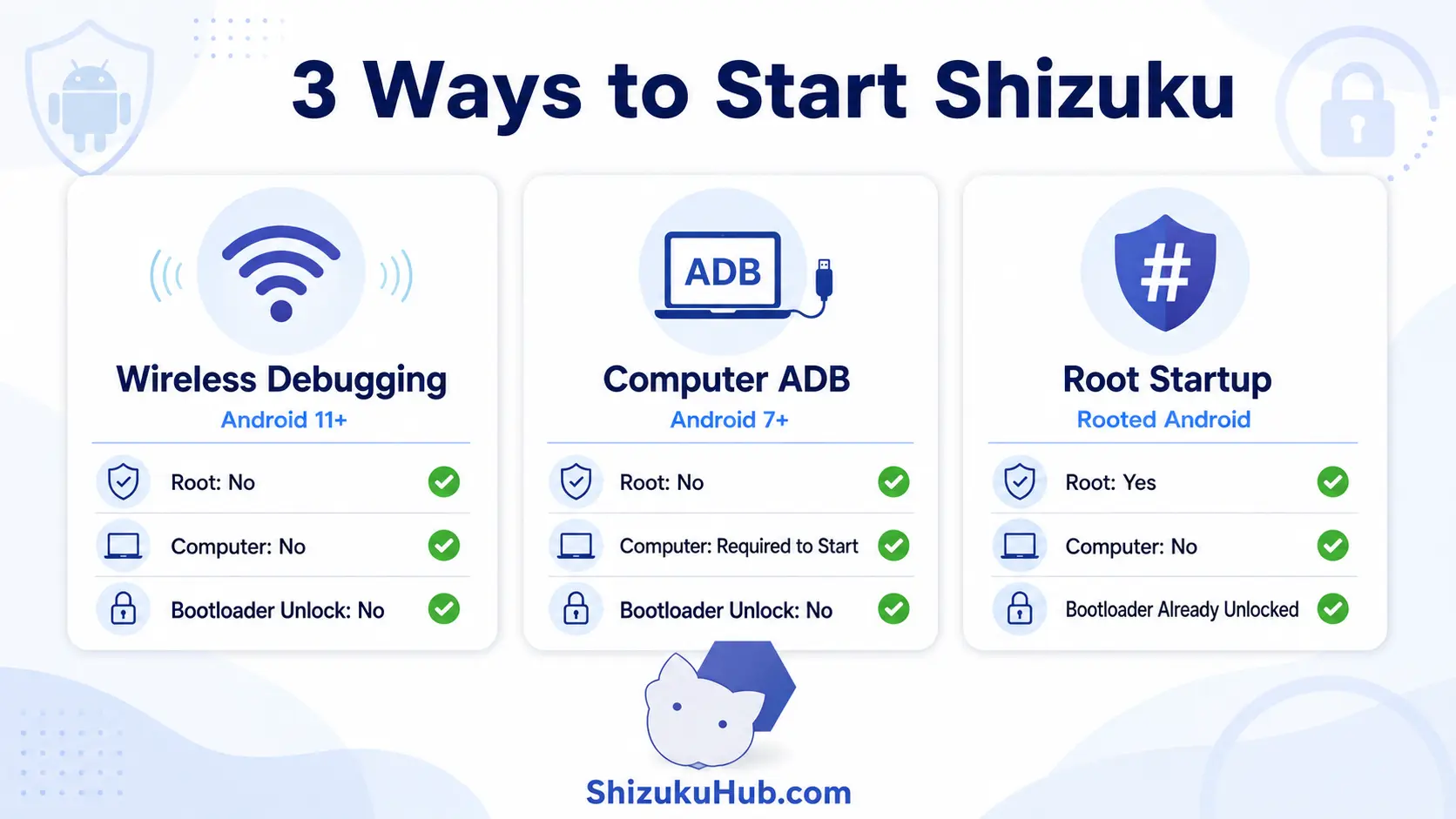
This visual comparison separates the three startup methods. Wireless debugging is the simplest no-computer option on newer Android versions, while computer ADB remains useful across a wider range of devices.
Shizuku startup requirements compared
| Startup Method | Android Version | Root Needed? | Computer Needed? | Bootloader Unlock? |
|---|---|---|---|---|
| Wireless debugging | Android 11 and newer | No | No | No |
| Computer ADB | Android 7 and newer | No | Yes, for startup | No |
| Root startup | Rooted devices | Yes | No | Already handled by root setup |
For Android 11 and newer, follow the Shizuku wireless debugging steps. If you prefer USB or use an older release, start Shizuku with computer ADB.
What Shizuku can do without root
ADB-mode Shizuku gives supported apps access to operations available to Android’s shell user. Depending on the companion app and phone, this can include package management, permission and app-ops changes, app freezing, shell commands, restricted-folder workflows, backup operations, and selected system settings.
- Remove or disable selected bloatware packages for the current user.
- Grant supported app permissions or adjust app-ops through a trusted permission manager.
- Freeze or suspend apps without uninstalling them.
- Run many ADB-style commands directly on the phone through a compatible terminal.
- Help supported file managers access restricted Android/data and OBB workflows.
- Provide extra capabilities to backup, installer, automation, and customization apps.
Explore the broader list in Shizuku uses and compare apps that support Shizuku.
What no-root Shizuku cannot do
No-root Shizuku is not identical to full root. ADB shell privileges are limited and can vary between Android releases and manufacturer ROMs.
- It cannot modify the kernel, boot image, recovery, radio firmware, or protected partitions.
- It cannot automatically make root-only apps compatible with Shizuku.
- It cannot bypass every signature permission, OEM policy, SELinux rule, or hardware-backed security control.
- It cannot keep the ADB-started service alive through a full reboot without starting it again.
- It cannot guarantee that every hidden or restricted Android API remains available after an OS update.
Which Android versions can use Shizuku without root?
Android 11 and newer: Wireless debugging provides an on-device startup method without root or a computer. Pairing is usually needed once, while service startup must be repeated after reboot.
Android 10 and older supported releases: Use the computer ADB method. Connect the phone, authorize USB debugging, and run the command displayed inside Shizuku. The bootloader stays locked.
Android 15 and Android 16: The same no-root concepts apply, although menu names and background limits can change. Review the current Shizuku Android 15 and 16 compatibility information for newer releases.
When does root-mode Shizuku make sense?
Root startup is useful only when the phone is already rooted and the companion app needs operations that exceed ADB shell privileges. It can also make startup more convenient on some root configurations. Rooting solely to run Shizuku is unnecessary for most users because the two no-root methods already cover common use cases.
Root mode increases the potential impact of every authorization. Compare Shizuku and root access before deciding whether the extra capability is justified. If an ADB-mode app already completes the task, remaining on the narrower privilege level is usually the simpler choice.
Why no-root Shizuku is the better default for most users
No-root startup preserves a narrower privilege boundary than running the service as root. This reflects the NIST principle of least privilege: a process should receive only the access needed for its task. In practice, use ADB-mode Shizuku when it provides enough capability and approve only the companion apps you understand.
- Keep the bootloader locked unless an unrelated requirement genuinely needs unlocking.
- Use one trusted Shizuku app for a specific task instead of authorizing many unfamiliar utilities.
- Prefer reversible changes, such as freezing or disabling, before permanent package removal.
- Review Shizuku’s authorized-app list and revoke unused access.
- Back up important data before package, permission, or automation changes.
What happens after reboot?
A full reboot ends a Shizuku service started through wireless debugging or computer ADB. The app remains installed and earlier companion-app approvals may remain recorded, but those apps cannot perform Shizuku operations until the service starts again.
On Android 11 and newer, reopen Shizuku and use wireless debugging startup again. With computer ADB, reconnect and rerun the displayed command. If startup repeatedly fails, use the solutions in Shizuku not running after reboot.
Does no-root Shizuku affect warranty, banking apps, or Play Integrity?
Shizuku’s normal ADB startup does not unlock the bootloader or patch the boot image. That means it avoids the device modifications normally associated with rooting. However, banking apps, enterprise policies, manufacturer warranty terms, and integrity checks differ, so no universal guarantee should be made for every phone and configuration.
The companion app can still make meaningful package or settings changes after you authorize it. Evaluate those changes separately from Shizuku itself, and reverse experimental settings if another app reacts unexpectedly.
Frequently asked questions
Use Shizuku without rooting your phone
Download the current APK, choose wireless debugging or computer ADB, and keep your bootloader locked. Root startup remains optional for devices that are already rooted.